
Paint Loop: Pixel Puzzle
Unico Games StudioPuzzle
4.7217.00 Reviews
- Version
- 1.001
- Installs
- 50.00K
- Age Rating
- Everyone
Screenshots
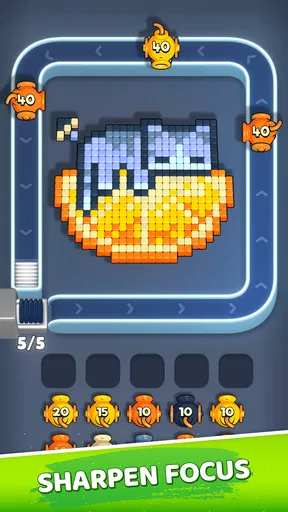

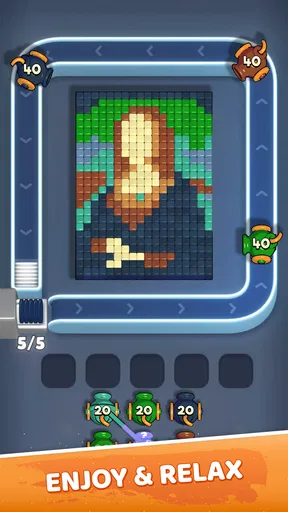
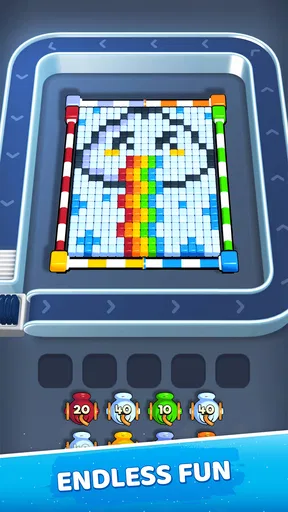
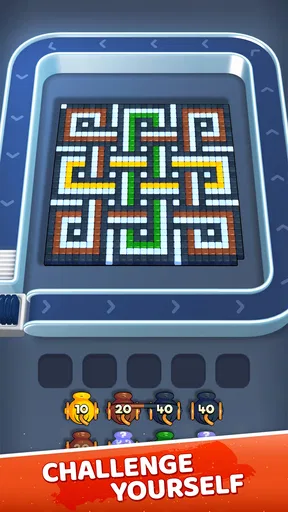

Our Review of Paint Loop: Pixel Puzzle
 Analysis by Appyee
I went into Paint Loop: Pixel Puzzle expecting a quick color-sorting game, and that is exactly where its appeal begins. It is a puzzle title from Unico Games Studio built around short, fast decisions rather than long explanations or a complicated story. The basic idea is easy to understand, but the pressure comes from trying to keep your attention steady while the pace demands quicker reactions. After spending time with it, I see it as the kind of game that fits naturally into small breaks, especially when I want something active enough to hold my focus without asking me to learn a large set of rules.
Its presentation also makes the game approachable. The store description positions it as a test of speed, focus, and reflexes, and that combination describes the experience better than calling it a traditional brain teaser. I would not choose it when I want a slow, deeply strategic puzzle with plenty of time to plan. I would choose it when I want a compact challenge that makes me react, notice patterns, and recover quickly from a mistake.
A simple idea that becomes demanding quickly
The strongest part of the design is the gap between understanding the task and performing it well. A player can grasp the central sorting concept almost immediately, but that does not mean every round feels effortless. The challenge is less about discovering a hidden rule and more about maintaining accuracy while the game keeps asking for attention. That makes the first few sessions welcoming, while later attempts can become surprisingly absorbing.
I also like that the concept does not depend on a story, character collection, or a large amount of dialogue. The focus stays on the puzzle itself. For someone who dislikes games that bury the main activity under menus and secondary systems, this directness is useful. You can open it with a clear idea of what your hands and eyes need to do, then judge your performance by how calmly and accurately you handle the next sequence.
At the same time, this simplicity means the game will not satisfy everyone. Players who need exploration, narrative progression, or a strong sense of unlocking new worlds may find the format narrow. Paint Loop is centered on execution. Its pleasure comes from improving your response to the same kind of problem, not from collecting a large set of unrelated experiences.
Why the pressure matters more than the premise
In my experience, the interesting part is the way speed changes a familiar sorting task. When I have plenty of time, recognizing a color relationship is straightforward. Once the game expects faster choices, a moment of hesitation becomes important. I start noticing whether I am looking carefully or simply tapping based on an assumption. That makes the title a useful little exercise in visual discipline, because rushing can be just as damaging as being too slow.
One practical way to play is to separate recognition from movement. I found that looking at the full arrangement for a brief moment before committing to a tap can be more reliable than reacting to the first element that catches my eye. This is not a hidden button or an official technique; it is simply a better habit for a game where reflexes can tempt me into careless decisions. When I slowed my eyes slightly while keeping my actions deliberate, the experience felt less random and more like a skill I could improve.
Another useful approach is to treat failed attempts as information rather than as a reason to immediately play faster. If I make a mistake because I confuse similar visual cues, repeating the same hurried behavior rarely helps. I get more from identifying whether the problem was attention, timing, or an impulsive tap. That distinction matters because the best response to a focus error is different from the best response to a speed limitation.
Playing during an ordinary day
A realistic use case is a short waiting period when I do not want to start a large game. I can imagine opening Paint Loop while waiting for an appointment, sitting on public transport, or taking a brief break between tasks. The format suits those moments because the central activity is immediately understandable. I do not have to remember a complicated quest, rebuild a strategy from a previous session, or commit to a long match before I know whether I have the energy to play.
It can also work as a small reset between demanding activities. The focus required is different from reading messages or scrolling through a feed, so a few rounds can feel more engaging than passive screen time. I would still avoid using it when I need complete mental rest, because the speed element asks me to stay alert. This is a game for redirecting attention, not necessarily for relaxing in the quietest sense.
For younger players, the Everyone content rating makes the game broadly accessible from an age-classification perspective. That does not mean every child will enjoy the pressure. Some players prefer puzzles they can solve at their own pace, while others enjoy the feeling of beating a personal reaction limit. I would introduce it to a child as a quick visual challenge rather than promising a calm educational activity.
Progress feels personal rather than expansive
The main form of progress here is improvement in my own consistency. I am not drawn forward by a complex upgrade tree or a narrative mystery. Instead, I want to see whether I can make fewer careless choices, stay composed for longer, and respond more cleanly when the pace rises. That kind of progress is modest but satisfying when I enjoy repeatable skill games.
This also creates a clear trade-off. A player who likes measurable mastery may appreciate the direct feedback of doing better through practice. A player who needs frequent novelty may feel that the experience becomes repetitive once the central interaction is familiar. The game’s value depends heavily on whether repeating a focused task feels rewarding to you. I would not recommend it as a replacement for a large puzzle collection; I see it as a specialized, reflex-oriented addition.
My advice is to avoid treating every attempt as a test of maximum speed. I get more enjoyment by alternating between careful runs and faster runs. Careful play helps me understand the visual demands, while faster play shows whether that understanding holds under pressure. This approach also reduces the frustration that comes from turning every mistake into a personal failure.
What spending means in this particular game
Paint Loop is free to download, which makes trying the core experience straightforward. The game includes optional in-app purchases priced from $1.99 to $89.99 per item. That range is important to keep in mind before spending, particularly because a quick puzzle game can encourage repeated sessions and impulse decisions. I would approach purchases slowly and decide first whether the basic play loop genuinely holds my attention.
I do not see a reason to assume that spending automatically makes someone better at the sorting challenge. The useful skill is still attention and timing, so I would judge any optional purchase by its practical value to my own experience rather than by the idea that it might improve performance. If you are comfortable playing without buying anything, the free entry point lets you decide whether the game is worth keeping before considering an optional item.
For families, the purchase range is a reason to keep normal device-store safeguards in place. I would not hand the game to a child without checking the purchase controls on the device, even though the content rating is Everyone. That is not a criticism of the puzzle itself; it is simply sensible whenever a free game offers optional purchases with a broad price range.
Fairness is harder to judge than accessibility from the information available to a player at first glance. I can say that the game is free to start and that purchases exist, but I would not claim that every purchase is cosmetic, that none affects progress, or that the game is fully free of pressure to spend without a clear explanation inside the game. My trust would depend on reading each purchase description carefully and seeing whether the game makes the distinction between optional convenience and meaningful advantage clear.
Competitive fairness and personal records
This kind of game naturally invites comparison, even when the competition is only with my previous attempt. Speed-based puzzles feel fair when success seems connected to observation and controlled movement rather than to buying help. That is why I pay close attention to whether my mistakes feel understandable. When I can identify the visual cue I missed or the moment I rushed, I feel motivated to try again. When an outcome feels unclear, the pressure becomes less satisfying.
I would recommend treating personal consistency as the most dependable measure of progress. Without assuming the presence of particular leaderboards, rankings, or multiplayer systems, I would not choose this title specifically for social competition. Its strongest competitive element, from my perspective, is the private challenge of improving my own response. That makes it suitable for players who enjoy self-improvement but less suitable for someone looking for a rich head-to-head puzzle community.
There is also a fairness advantage in keeping expectations realistic. A fast result does not always mean a better result if accuracy suffers. I would rather complete a sequence cleanly than chase speed so aggressively that every attempt becomes a guess. That balance is where the game feels most rewarding: the pressure is present, but I still feel responsible for the decision I made.
Device fit, access, and practical expectations
The game supports Android devices running version 6.0 or later, so its stated compatibility reaches a wide range of devices. The current version is 1.001, and the title was released on February 16, 2026. Those details are useful when deciding whether it fits an older phone or tablet, but compatibility alone does not guarantee that every screen will feel equally comfortable for quick visual decisions. A larger display may make sorting easier to read, while a compact screen could make precise tapping more demanding for some players.
I would also test the game in the environment where I actually plan to use it. A puzzle that depends on quick attention is less enjoyable if notifications interrupt every attempt or if the device’s touch response feels inconsistent. This is not a special requirement unique to one phone model; it is simply more noticeable in a game where a small delay or accidental touch can change the outcome.
If you are looking for a game to play with one hand during short breaks, the concept seems naturally suited to that kind of session, but I would still pay attention to comfort. Repeated rapid taps can become tiring if I hold the phone awkwardly. Taking brief pauses helps keep the challenge about concentration rather than hand strain.
Where it differs from slower puzzle alternatives
Compared with crossword-style games, number puzzles, or tile-matching titles that let me think through a move, Paint Loop puts more weight on immediate visual processing. I cannot rely on extended planning in the same way. That makes it a better choice when I want energy and urgency, but a worse choice when I am looking for a quiet problem-solving session.
It also differs from large puzzle games that use dozens of mechanics to maintain variety. Here, the appeal is concentrated. I know what kind of attention the game wants from me, and I can practice that skill directly. The benefit is clarity; the cost is that players may notice repetition sooner. If my priority is a broad campaign with changing rules, I would select another puzzle game. If my priority is a quick test of visual focus, this more focused design makes sense.
Against casual games built around collecting items or decorating spaces, the reward is less about building something over time and more about the feeling of a clean run. That distinction is worth considering before downloading. Paint Loop is not the title I would open when I want to unwind through customization. I would open it when I want my attention challenged for a few minutes.
Questions I would settle before installing
The first question is whether it is truly suitable for short sessions. I would say yes, provided you enjoy repeating a compact skill challenge. The concept does not require a long story commitment, and the focus on quick decisions makes it easy to stop after a few attempts. However, the same structure may feel repetitive if you need constant new objectives.
The second question is whether a child can use it comfortably. The Everyone rating makes it broadly accessible in content terms, but the speed requirement still matters. A child who enjoys reflex games may find it exciting, while a child who prefers unlimited thinking time may become frustrated. I would let the player try it briefly rather than assuming the age rating predicts enjoyment.
The third question concerns spending. You can begin for free, while optional purchases range from $1.99 to $89.99 per item. I would decide on a personal spending limit before playing and avoid buying anything during a moment of frustration after a failed attempt. That simple rule keeps the purchase decision separate from the competitive pressure of the puzzle.
The fourth question is whether it is a good choice for serious competition. My answer is conditional. It can support a personal race against previous performance, but I would not choose it expecting a full competitive ecosystem unless the in-game details clearly provide one. The safest expectation is a focused solo puzzle experience where your own accuracy and speed are the main challenge.
The final question is whether it offers enough depth for long-term play. I think that depends on your relationship with repetition. Players who enjoy refining reflexes can return often and find small improvements meaningful. Players who measure depth by new mechanics, story chapters, or extensive progression may want a broader alternative alongside it.
My trust verdict after weighing the trade-offs
My overall impression is positive but specific. Paint Loop works best as a compact, accessible puzzle game that turns sorting into a test of focus under pressure. I like its directness, its suitability for brief sessions, and the way it rewards calm visual decisions instead of pretending that speed alone is enough. The experience has a clear identity, even if that identity is narrower than what some puzzle fans want.
The spending model deserves attention because the game is free to start but includes optional items from $1.99 to $89.99. I would not let the free download create an assumption that every part of the experience is equally unrestricted, and I would review purchase prompts carefully before paying. That cautious approach is especially important for shared devices or younger players.
With a 4.7 average from around 1.9 thousand ratings and more than 50 thousand installs, it has already attracted a meaningful early audience. Those figures make it easier to see why the concept appeals to people, but they do not replace personal testing. My own recommendation is aimed at players who enjoy fast visual puzzles, self-imposed improvement, and short sessions with a little pressure. If you want a slow, expansive, story-rich puzzle adventure, I would skip this one. If you want a focused reflex challenge that is easy to pick up and difficult to perform perfectly, Paint Loop: Pixel Puzzle is worth trying for free before deciding whether its optional spending fits your habits.
Verdict
Strengths of Paint Loop: Pixel Puzzle
- Simple controls make it easy to start playing immediately.
- Short levels are ideal for quick breaks or casual sessions.
- Colorful pixel artwork gives the game a cheerful visual style.
- Puzzle mechanics encourage careful planning rather than fast reflexes.
- Works well for players who enjoy relaxing, low-pressure challenges.
Limitations of Paint Loop: Pixel Puzzle
- Some puzzles may feel repetitive after extended play.
- Difficulty can increase unevenly between consecutive levels.
- Hints or extra help may be limited during tricky puzzles.
- The game may offer little appeal to players seeking action or variety.
- Progress can feel slow if later stages require repeated attempts.
Other Releases by Unico Games Studio
View All
Yarnation: Unravel Flow
Puzzle4.6
Similar Picks in This Category
View All
Block Blast!
HungryStudio4.8

Braindom: Brain Games Test
Lahana Game Studio4.6

AMAZE!
CrazyLabs LTD4.6

Sudoku - Classic Sudoku Puzzle
Oakever Games4.7

Art Puzzle - Puzzle Games
Easybrain4.8

Amaze GO!
Oakever Games4.9
Frequently Asked Questions
What is Paint Loop: Pixel Puzzle, and how is it played?
Paint Loop: Pixel Puzzle is a relaxing color-and-logic game built around completing pixel-art images. Each level presents a structured grid or looping pattern that you gradually fill by placing colors in the correct positions. The gameplay is easy to understand, but later puzzles require more attention, pattern recognition, and patience. It is a good choice for short sessions because you can usually play one puzzle at a time without needing a long uninterrupted commitment.
Is Paint Loop: Pixel Puzzle suitable for beginners and children?
Yes, the basic mechanics are approachable for beginners because the game introduces its puzzle format gradually and does not require advanced gaming skills. Players mainly need to identify colors, follow visual patterns, and tap accurately. However, the difficulty can increase as levels become more detailed, so younger children may need occasional help. Parents should also review the app’s age rating, advertising, and purchase settings before allowing unsupervised play.
Does Paint Loop: Pixel Puzzle work offline?
Many puzzle features may remain available without a constant internet connection, which makes Paint Loop: Pixel Puzzle convenient for travel, waiting rooms, or other situations with limited connectivity. Nevertheless, online access may still be required for advertisements, updates, cloud-related features, analytics, or restoring purchases. Because offline behavior can vary between versions and devices, it is best to download the latest release and test the game once before relying on it without internet access.
Are there advertisements or in-app purchases in Paint Loop: Pixel Puzzle?
The game may use advertisements or optional in-app purchases as part of its free-to-download model. Ads can appear between puzzles or when you choose a reward, while purchases may offer benefits such as removing advertising, unlocking content, or providing hints. Before downloading, check the current store listing for exact pricing and purchase details. If children use the app, enable device-level purchase restrictions to prevent accidental transactions.
What should I do if I get stuck on a difficult puzzle?
When a puzzle becomes challenging, start by checking the easiest colors or sections and work outward rather than guessing randomly. Zooming in, if supported, can make small pixel areas easier to inspect. Hints may also be available, although they could require watching an advertisement or spending an in-game resource. If you make a mistake, use the undo or reset option when available. Taking a short break can also help you notice patterns more clearly.
Play our best games!


